Advanced Address Search

Follow the instructions below the router image that most closely resembles your FiberFirst provided equipment.

AdTran

AdTran Router

To get the most out of your AdTran router, click the appropriate link below to download the Intellifi by Adtran.

The Intellifi app makes it easy to:

  • Personalize your experience – Set custom profiles and manage the internet experience for each family member.
  • Ensure a secure network – Advanced security features, indlucing content filtering and malware blocking, ensure a secure network.
  • Offer guest access – Setup a separate guest netowrk and share access with a simple QR code.
  • Track your network health – Get an instan view of your home network, connected devices, and bandwidth usage.
Download_on_the_App_Store_Badge_US-UK_RGB_blk_092917
GetItOnGooglePlay_Badge_Web_color_English

Viewing on a computer? Scan the QR below to download the app from the appropriate store for your device.

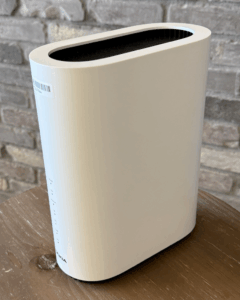
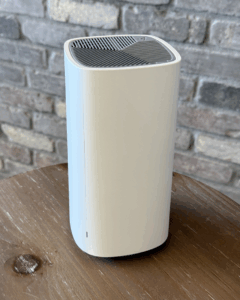
Nokia

Nokia Router

To get the most out of your Nokia router, click the appropriate link below to download the Nokia WiFi app.

You can do the following with your Nokia WiFi app:

  • Manage internet access for connected users
  • Quickly create and share a guest network
  • Easily check each devices’ connection speed in your network
  • Automatically update your network at scheduled times
  • Identify which devices have connection issues
Download_on_the_App_Store_Badge_US-UK_RGB_blk_092917
GetItOnGooglePlay_Badge_Web_color_English

Viewing on a computer? Scan the QR below to download the app from the appropriate store for your device.

Quick Troubleshooting Tips

Occasionally it may be necessary to reboot your router to help reestablish internet connections.

The simplest way to reboot your router, regardless of model, is to by temporarily  disconnecting power. To do this, simply locate the power cord that is connect from the wall outlet into the router, then remove the connection at the router. Wait 15-20 seconds and then reconnect the power connector to the router. Allow 5-7 minutes for the router to complete the reboot and connection process.

If you continue to have issues with connectivity, please contact FiberFirst Customer Care 24 hours a day at 833.342.7444. Additional ways to contact support are available Monday – Friday from 7am – 7pm via email ([email protected]), website Chat and Facebook Messenger.

Moving?

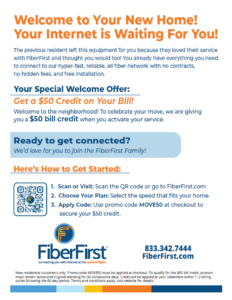
When it’s time to move, FiberFirst wants to make it as easy as possible for you. That’s why we’ve developed a program that not only simplifies the process, but also provides an opportunity for you to receive a financial reward!

Simply leave the FiberFirst provided equipment behind when you move along with a printed copy of the flyer below to encourage the new residents to sign up with FiberFirst. Once they’ve established new service and have been a FiberFirst customer for 60 days, we’ll send you a $50 Amazon.com Gift Card!

End